
Detroit Free Press: Freep
USA TODAY Co.News & Magazines
3.01.03K Reviews
- Version
- 8.10.3
- Installs
- 100.00K
- Age Rating
- Everyone 10+
Screenshots






Our Review of Detroit Free Press: Freep
 Analysis by Appyee
When I decide whether a local-news app deserves a place on my phone, I look beyond the headline feed: I want to know whether it helps me follow my community, whether I can read comfortably in short bursts, and whether its mix of local reporting and broader coverage suits my habits. Detroit Free Press: Freep is aimed squarely at readers who want Detroit-area news alongside sports and entertainment, rather than a general feed built around stories from everywhere.
That focus is its clearest reason to choose it. If Detroit is part of your daily life—because you live there, work there, follow its teams, or have family in the area—the local lens can make the news feel more relevant than a national headlines app. If you mainly want a wide selection of international reporting, or prefer one app that gathers many publishers, a broader news service may suit you better.
What I would check before making it a daily habit
I’d start by asking how I actually read the news. A quick morning scan, a deeper evening read, and a check on local sports are different routines. This app brings news, entertainment, local sports, and an eNewspaper together, so it makes the most sense if at least a couple of those are part of your regular reading. If you only want occasional breaking alerts, a lighter news source may be easier to live with.
I’d also consider whether I prefer a familiar newspaper-style experience or a constantly refreshed stream. The eNewspaper gives the app a format that may appeal to readers who like following an edition, while article-based browsing is more convenient when I have only a minute. I would try both approaches before settling on a routine; the best one depends on whether I read from beginning to end or jump straight to a subject.
There is a practical cost question, too. The app is free to install, but it includes in-app purchases, with listed items ranging from $1.99 to $69.99. I’d browse the available access options carefully before committing, especially if I expect to read regularly. The key decision is not simply whether the download costs anything, but whether the content and format I want are covered by the option I choose.
The Interface: Simple Yet Effective
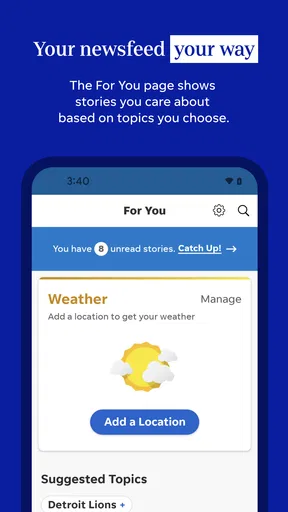
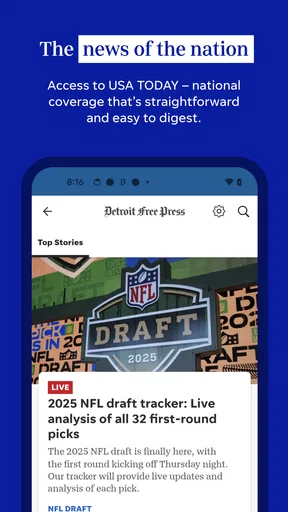
First things first, let’s talk about the user interface. Navigating through Detroit Free Press: Freep is as smooth as butter. The layout is intuitive, which means you’re not going to waste time figuring out where things are. Articles are neatly categorized, and you can easily access everything from local news to sports and entertainment.
What’s really cool is the way the app integrates multimedia. Images and videos load quickly and are of high quality, making the whole experience visually appealing. It’s like having a digital newspaper in the palm of your hand, without the ink smudges!
Where its local focus earns a place
The strongest case for this app is not that it can replace every news source; it is that Detroit readers can keep local coverage close to the rest of their daily reading. A national headlines app can tell me what is dominating the wider conversation, but it may not give local developments the same prominence. A newspaper’s own app can make more sense when I want the regional context and reporting associated with that publication.
That distinction matters in an ordinary week. I might check local news over breakfast, return later to follow a developing story, then open the sports section after a game. Keeping those interests within one publication’s app can be more convenient than searching the web repeatedly or switching among unrelated feeds. It also gives me a clearer boundary: this is a place to check what matters around Detroit, not necessarily my only source for every subject.
The app is published by USA TODAY Co., and its history stretches back to September 14, 2010. For someone comparing options, that background helps explain why the experience is centered on a named local newspaper rather than on an anonymous collection of trending links. I’d choose it for that editorial identity and local connection, not because I expect every reader to prefer the same selection of stories.
Content Galore: Dive into the Stories
If content is king, then this app is the whole royal family. From breaking news alerts to in-depth features, Detroit Free Press: Freep covers it all. The writing is engaging, keeping you hooked from the headline to the very last word.
One of my favorite features is the personalized notifications. You can customize alerts based on your interests. So whether you’re into politics, sports, or lifestyle, the app keeps you updated without overwhelming you with irrelevant news.
And let’s not forget the investigative reports. These pieces are thorough and well-researched, adding depth to the news that you just don’t get from a quick online search. It’s this commitment to quality journalism that really sets the app apart.
A useful routine for alerts and longer reads
For a calmer experience, I’d treat notifications as a filter rather than turning on every alert. Start with the subjects you genuinely need to follow, such as local developments or a team you care about, and leave the rest for when you open the app. That way, an alert can prompt me to check a consequential update without making the phone interrupt every quiet moment. If I find myself dismissing alerts without reading them, that is a sign to narrow the selection.
A realistic weekday routine might be to scan a few local headlines before leaving home, then save a longer piece for a break when I have enough time to read it properly. The value is in separating urgent updates from stories that deserve more attention. I would not assume a notification gives the whole picture: for a developing issue, opening the article and returning to it later is a better way to follow the details than relying on a headline alone.
The app’s mix of quick updates and deeper reporting also creates a useful trade-off. A broad feed is efficient when I want a fast overview, but a focused local publication can be more rewarding when the story affects the place I live or the people I know. For national or international coverage outside that focus, I’d keep another trusted source in my routine instead of expecting one regional app to do every job.
Offline Reading: Because Life Happens
We’ve all been there – stuck in a place with no internet connection, desperately wanting to catch up on the latest news. The offline reading feature is a lifesaver in such scenarios. You can download articles and read them later, which is incredibly convenient for those long commutes or when you’re hanging out in a Wi-Fi dead zone.
This feature is straightforward to use. Just tap on the download icon next to the article, and voila, it’s saved for later. It’s small details like these that show the app’s commitment to user satisfaction.
Making offline reading work in practice
I’d use offline access deliberately rather than waiting until a connection disappears. Before a commute or a trip through an area with unreliable service, I’d save the stories I already know I want to finish. That turns a spare moment into reading time and avoids the frustration of opening an article only to find that the connection has dropped. It is especially useful for longer pieces that I would rather read in one sitting than skim between interruptions.
There is a small planning trade-off: saved stories are only useful if I choose them in advance, so this is not the same as having the whole publication available without a connection. I’d also make a habit of checking that an article has finished saving before I leave reliable service. For someone who mostly reads while connected at home, offline access may be a bonus rather than a deciding reason to install the app.
Where another kind of news app may fit better
If I want a cross-publication overview, an aggregator is usually the more natural choice. It can make it easier to compare how different outlets cover the same subject, while this app is better understood as a direct route into one newspaper’s local reporting and related sections. Neither approach is automatically superior: the right one depends on whether I value breadth across publishers or a more focused Detroit connection.
Likewise, readers who mainly follow national or global news may prefer a publication whose central mission matches those interests. Someone who wants only sports scores may find a dedicated sports source more direct, while a reader seeking local reporting, entertainment, and sports in one place has a stronger reason to try this app. I would not install it expecting it to replace specialist tools for every interest.
Ratings offer one more piece of context, but I would treat them as a prompt to test the app rather than a verdict. It has an average rating of 2.8 from around 2,500 ratings, so reader experiences are not uniformly positive. That makes a personal trial sensible: check whether the sections you care about are easy to reach, whether the reading experience suits you, and whether the access option you want is worth its cost before making it part of your routine.
Engage with the Community
Another aspect that I genuinely enjoy is the community interaction. The app allows you to comment on articles and engage in discussions with other readers. It’s like being part of a virtual newsroom where everyone gets to have a say. The discussions are lively and add a whole new dimension to the reading experience.
Moreover, the app has a feature where you can send tips or feedback directly to the editors. It’s nice to know that your voice can contribute to the news landscape and that the folks at Freep are listening.
What to expect before installing
The app is listed as free and is rated Everyone 10+, but those details do not mean every part of the reading experience necessarily comes without a purchase. I’d be comfortable trying it without paying first, then deciding whether the available in-app options match how often I read and which content I want. If I only check headlines now and then, I would be cautious about paying for access I may not use consistently.
It currently runs on iOS 8.0 or later and is at version 8.7.1. The version number is a useful check if I’m troubleshooting or comparing what I have installed, but I would judge the app by how it behaves on my own device: whether the sections I use are straightforward to reach and whether reading fits naturally into my day. With about 100,000 installs, it has found an audience, though that alone cannot tell me whether its local focus is right for my needs.
One thousand reviews provide more reader feedback to consider, but I would read comments with my own use case in mind. A complaint from someone who wants a different kind of news service may not matter to a Detroit reader, while repeated concerns about the parts I rely on would carry more weight. I’d use a short trial to answer practical questions: Can I find local coverage quickly? Do I like the eNewspaper format? Are alerts helpful rather than distracting? Those answers are more useful than assuming every reader will have the same experience.
Final Thoughts: Is It Worth Downloading?
So, is Detroit Free Press: Freep worth a spot on your home screen? Absolutely. It’s not just another news app; it’s a comprehensive tool for staying informed, all while being easy to use and engaging. Whether you’re a Detroit local or just someone who appreciates quality journalism, this app is definitely worth your time.
With its rich content, user-friendly interface, and interactive features, it’s no wonder that Detroit Free Press: Freep has become a staple in my daily routine. So go ahead, give it a download, and dive into the world of news like never before.
My recommendation depends on what you read
I’d recommend trying it if Detroit-area reporting is something you want to keep within easy reach, especially if you also read local sports or entertainment and like having an eNewspaper option. It is a more convincing fit for a resident, former resident, or regular follower of the area than for someone looking for a neutral, all-purpose digest of world news. Its strongest value comes from serving a particular readership, not from being the only news source anyone needs.
I’d skip it if I rarely read local coverage, want stories from many publishers in one feed, or prefer a dedicated source for a single subject. I’d also think twice before choosing a paid option until I know how often I use the app and which content I return to. For the right reader, the combination of local reporting, flexible reading, and a newspaper identity is compelling; for everyone else, a broader or more specialized alternative may be a better daily match.
Verdict
Strengths of Detroit Free Press: Freep
- User-friendly interface for easy navigation.
- Comprehensive local news coverage.
- Timely notifications of breaking news.
- Customizable news feed options.
- Offline reading mode available.
Limitations of Detroit Free Press: Freep
- Ads can be intrusive at times.
- Limited international news coverage.
- Occasional app crashes reported.
- Requires a stable internet connection.
- Some features behind a paywall.
Other Releases by USA TODAY Co.
View All
IndyStar: Indianapolis Star
News & Magazines2.7

AZ Central: Arizona Republic
News & Magazines2.5

The Detroit News: Local News
News & Magazines3.1

Florida Today: Local News
News & Magazines2.3
Similar Picks in This Category
View All
Google News - Daily Headlines
Google LLC4.0

X
X Corp.4.8

Flipboard:Your Social Magazine
Flipboard3.4

Opera News: breaking & local
Opera4.5

Hindi News by Dainik Bhaskar
Dainik Bhaskar Group4.0

Way2News Daily News App
Way2News ( Formerly Way2SMS )4.6
Frequently Asked Questions
What features does the Detroit Free Press app offer?
The Detroit Free Press app provides users with the latest news, sports updates, entertainment, and more from Detroit and Michigan. It includes personalized notifications, live video, and photo galleries. Users can also access exclusive stories and in-depth reports, making it a comprehensive source for local news.
Is the Detroit Free Press app free to use?
The app itself is free to download, and it offers some content without charge. However, to access premium articles and exclusive content, a subscription may be required. Users can choose from various subscription plans that cater to different needs and preferences.
How user-friendly is the Detroit Free Press app?
The app is designed with a user-friendly interface, ensuring easy navigation. It includes customizable settings, allowing users to personalize their news feed. The layout is clean and intuitive, making it easy to find articles and access different sections, such as sports or entertainment.
Can I customize notifications in the Detroit Free Press app?
Yes, the app allows users to customize notifications based on their interests. You can choose to receive alerts for breaking news, sports updates, or other specific categories. This ensures you stay informed about the topics that matter most to you, without being overwhelmed by unnecessary alerts.
Is the Detroit Free Press app available on all devices?
The Detroit Free Press app is available for both Android and iOS devices, ensuring wide accessibility. Users can download it from the Google Play Store or the Apple App Store. It supports a range of devices, providing a consistent experience across smartphones and tablets.
